
Export Shopify Inventory by Location to Google Sheets
Export Shopify inventory by location to Google Sheets for stock planning, purchasing, and replenishment decisions.
Export Shopify inventory by location to Google Sheets for stock planning, purchasing, and replenishment decisions.
Export Shopify customer data to Google Sheets for segmentation, CRM operations, and retention analysis.
Safely manage Shopify bulk delete workflows from Google Sheets with proper validation and rollback-ready processes.
Automate repeat Shopify import workflows using spreadsheet templates, validation, and controlled import runs with eCommix – Google Sheets Sync.
Learn how to automate Shopify exports for products, orders, inventory, and customers to Google Sheets with eCommix – Google Sheets Sync.
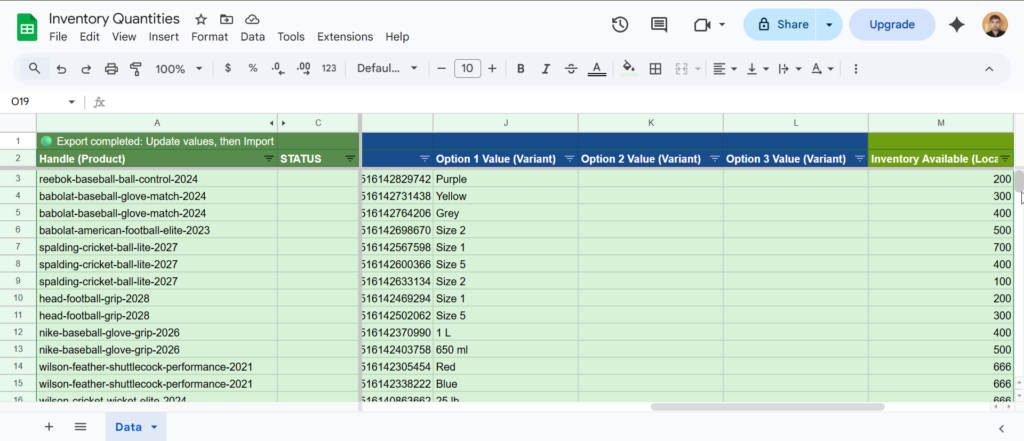
Manage Shopify inventory levels by location from a spreadsheet using Google Sheets and eCommix – Google Sheets Sync.
Update Shopify international and market-specific prices in bulk using region catalog price columns in eCommix – Google Sheets Sync.
Learn how to import Shopify products from a spreadsheet with eCommix – Google Sheets Sync, including how to structure product rows and variant rows correctly.
Import multiple Shopify product image URLs from one spreadsheet row using a semicolon-separated image list workflow in eCommix – Google Sheets Sync.
Update Shopify Cost per Item in bulk for product variants using Google Sheets and eCommix – Google Sheets Sync.