Auto-fulfill Shopify orders from Google Sheets
Let your warehouse or 3PL fill in tracking numbers directly in Google Sheets. eCommix picks them up, marks the order fulfilled in Shopify, and sends the standard tracking notification to your customer.
Free plan available
See it in action
Everything your supplier fills in, right in the sheet
No Shopify login, no new tool to learn. Your warehouse or 3PL closes out orders with the spreadsheet they already use.
Paste up to three tracking numbers per order
DHL, UPS, USPS, or any other carrier name
Optional link your customer can follow to track the parcel
Set it to Fulfilled - or just add a tracking number and eCommix fulfills the order
In transit, out for delivery, delivered, and more
Pick which location ships when an order could ship from several
Pick the Orders - Tracking Numbers template
You got new orders in Shopify. Great! Now they need to reach your supplier - don't forward them manually. Open eCommix and select the Orders - Tracking Numbers template from the Orders category. Every order exports to Google Sheets with the tracking columns ready to be filled in.
Auto-fulfill orders from Google Sheets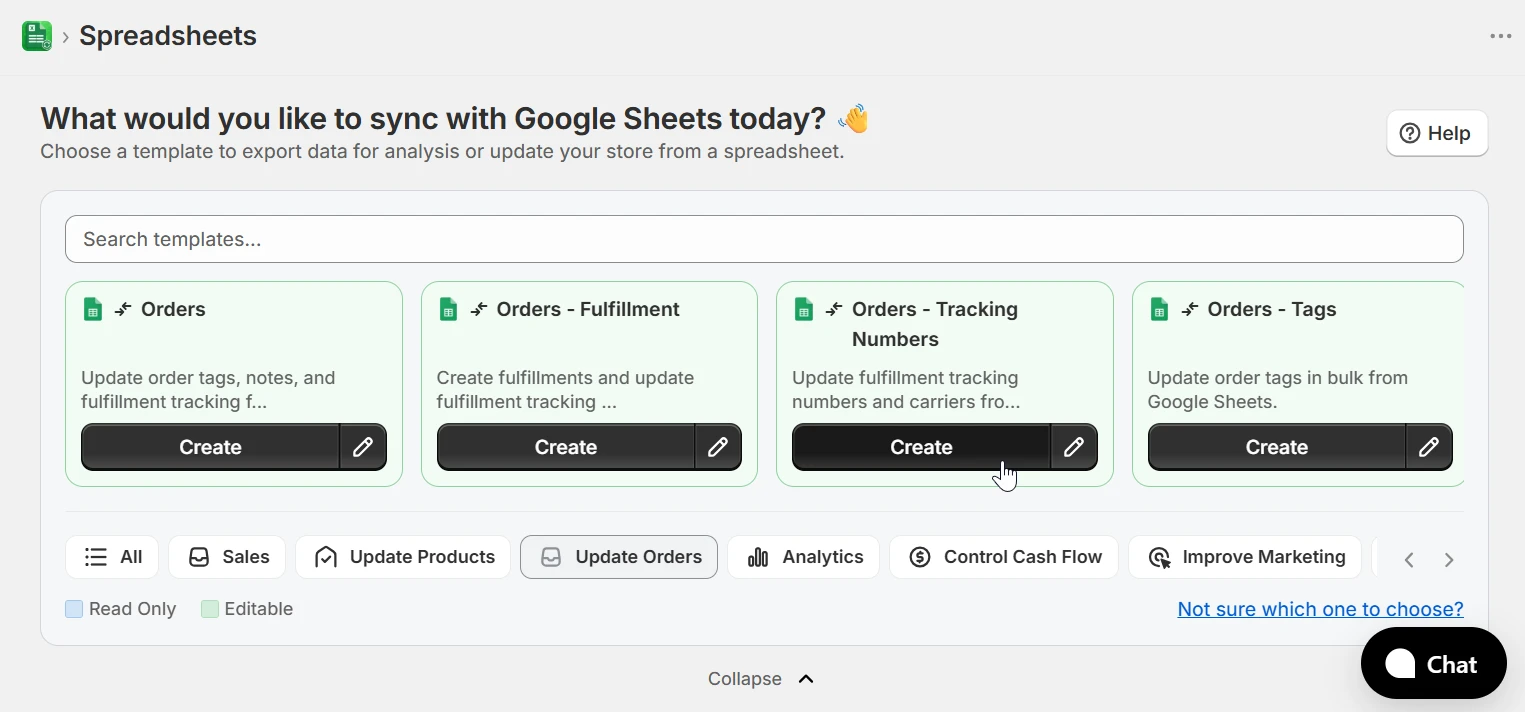
Auto-assign orders to suppliers by vendor, tags, or SKUs
Working with more than one supplier? Add a filter to each spreadsheet - by vendor, order tags, or SKU - and each supplier only sees the orders that are theirs. One sheet per supplier, no manual sorting, no orders slipping through.
Auto-fulfill orders from Google Sheets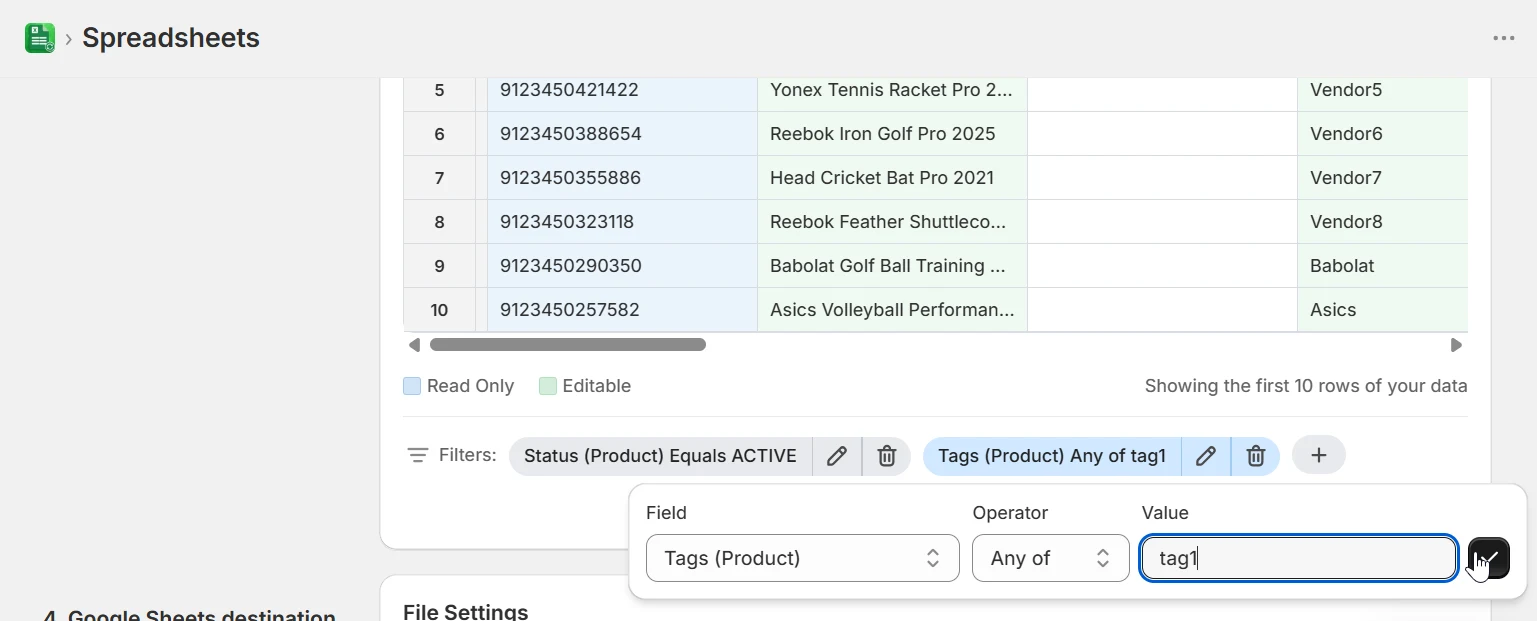
Share the sheet - your supplier fills in the tracking
Share the spreadsheet with your supplier or 3PL like any other Google Sheet. They paste the tracking number, carrier, and optionally a tracking URL next to each order, and update the fulfillment status. That's all they need - no Shopify login, no new tool to learn.
Auto-fulfill orders from Google Sheets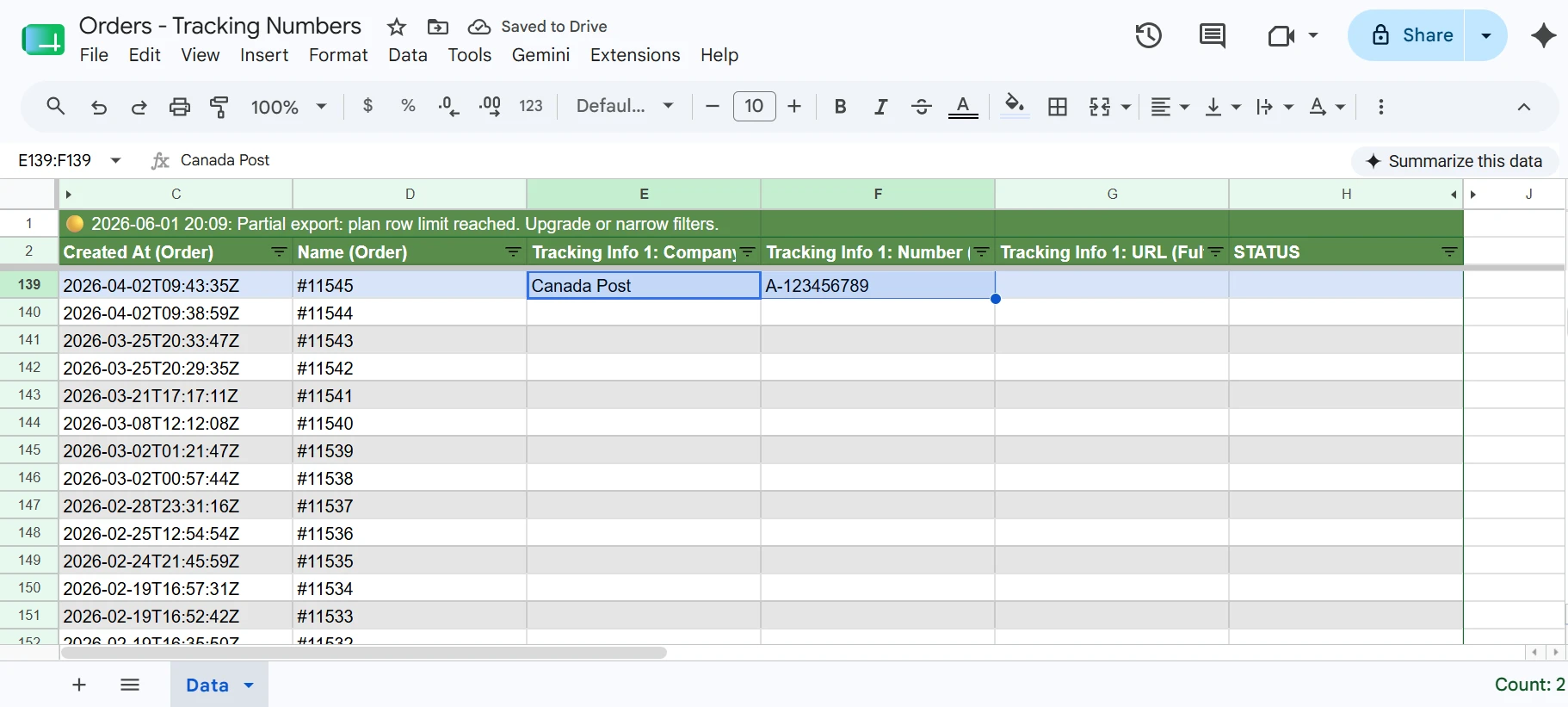
eCommix marks the orders fulfilled in Shopify
With the eCommix Google Sheets Add-on, those changes are applied back to Shopify - no CSV files, no re-typing. Each order is marked fulfilled with its tracking info attached, and Shopify sends your customer the standard shipping notification with the tracking link. Right after the sync, they know their order is on the way.
Auto-fulfill orders from Google Sheets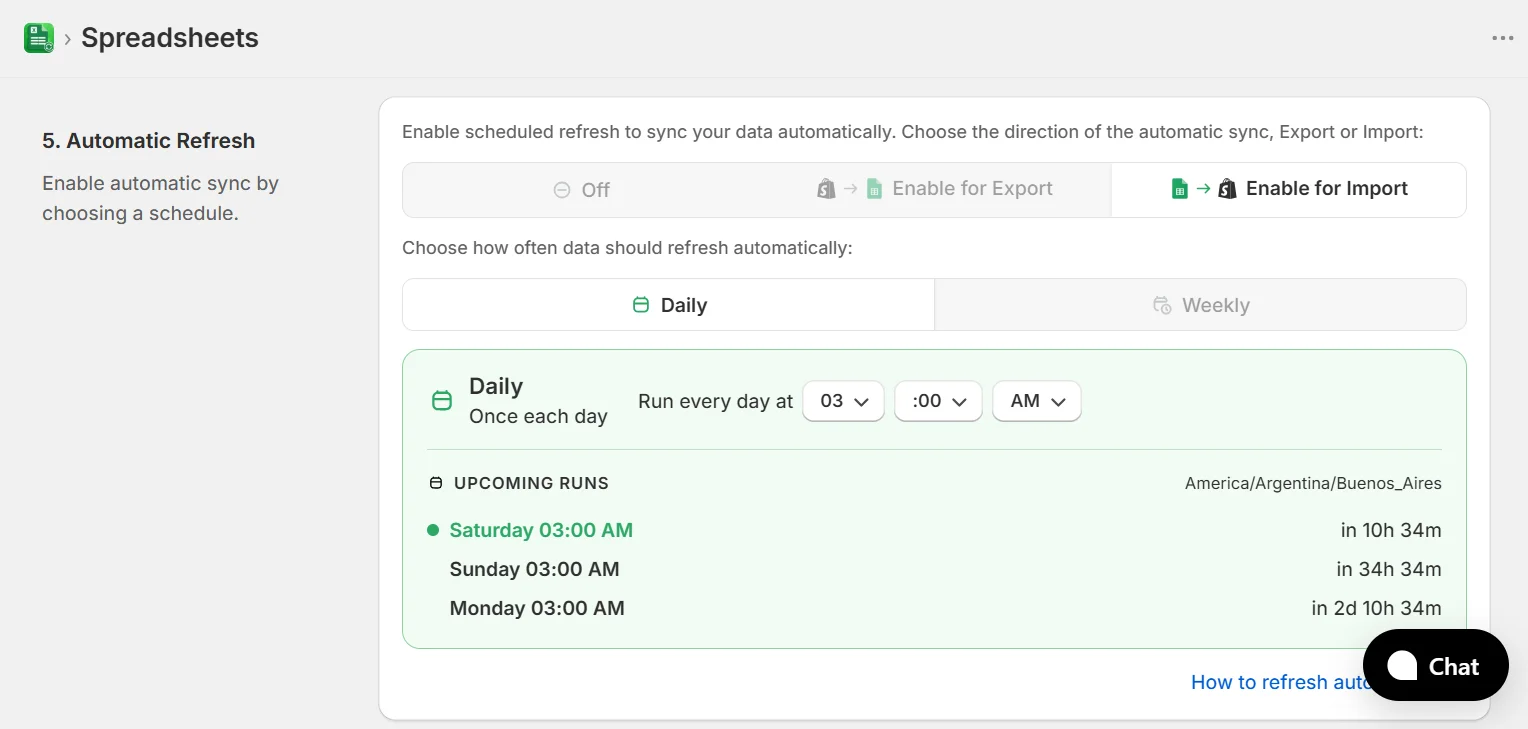
Let it run on autopilot
Best part? Turn on automatic refresh and every new order goes straight to the supplier's spreadsheet on your schedule - and their tracking updates flow back to Shopify the same way. You set it up once; the fulfillment loop runs itself.
Auto-fulfill orders from Google Sheets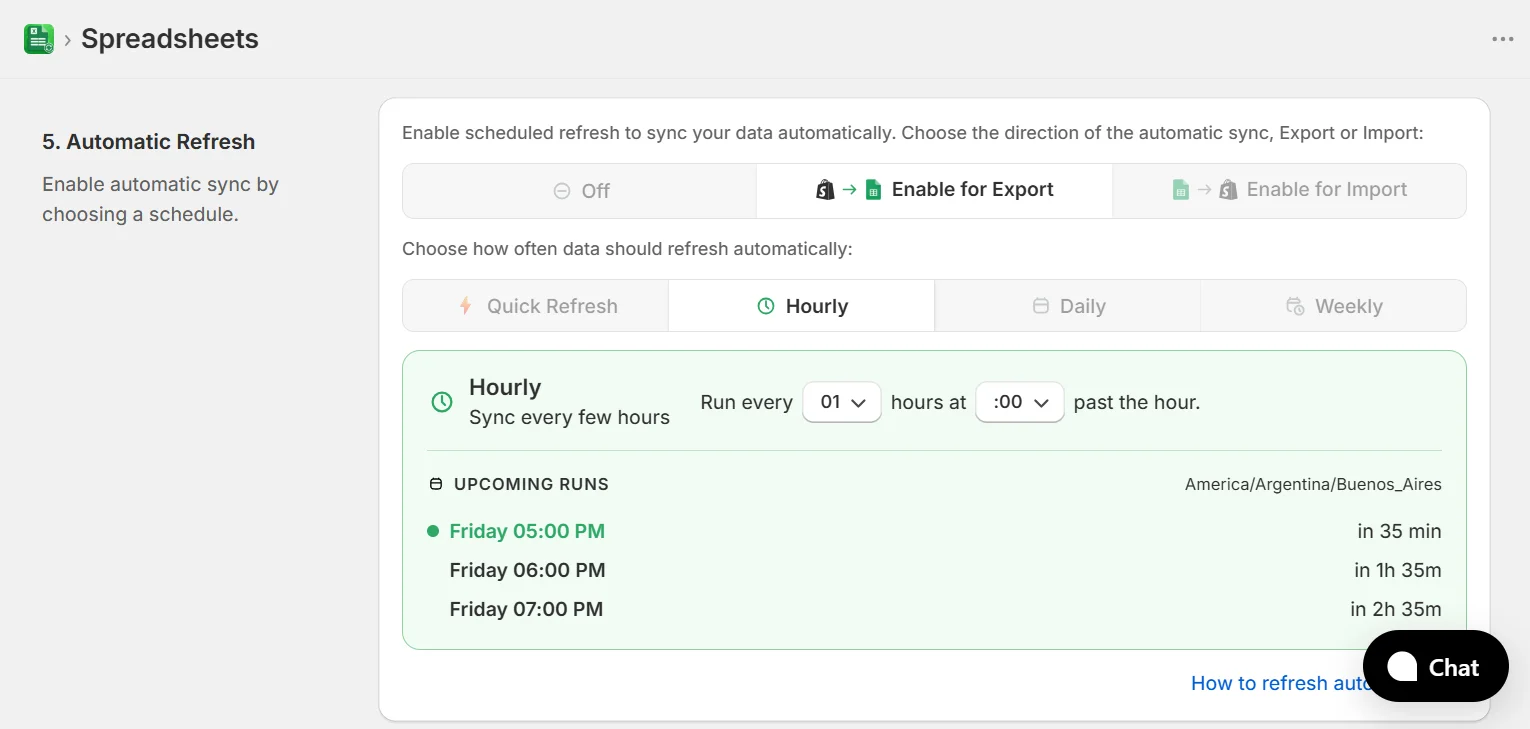
Who runs fulfillment from a spreadsheet
Anyone who ships orders but doesn't live in Shopify admin - and every merchant tired of copying tracking numbers by hand.
3PL fulfillment
Your third-party logistics partner works out of spreadsheets anyway. Give them one Google Sheet per store, and every tracking number they paste flows back into Shopify as a fulfilled order.
Dropshipping suppliers
Route each supplier's orders to their own sheet by vendor or SKU. They ship, fill in tracking, and your customers get notified - without you in the middle.
Multi-supplier routing
Tag orders or filter by vendor to split one order stream across several suppliers. Each sheet stays scoped to exactly the orders that supplier should see.
Warehouse teams without Shopify access
Packing stations don't need Shopify admin seats. Staff work the sheet top to bottom, paste tracking as parcels leave, and orders close out in Shopify automatically.
Virtual assistants
Let a VA manage fulfillment from the spreadsheet with nothing but Google Sheets access. Everything they enter is validated before it touches your store.
Batch fulfillment days
Ship twice a week? Export the open orders, hand the sheet to whoever is packing, and import once at the end of the day. Every customer gets their tracking email the moment the sync runs.
Frequently asked questions
Does my supplier need access to my Shopify store?
No. Your supplier only needs access to the Google Sheet you share with them. They never see your Shopify admin, your customer data beyond the order rows, or your other suppliers' orders.
When does my customer receive the shipping notification?
When the sync runs and the order is fulfilled with tracking information attached, Shopify sends its standard shipping-confirmation email with the tracking link - the same notification as fulfilling manually in the admin. Fulfilling a row without a tracking number does not trigger a customer email.
Do I have to set the fulfillment status, or is the tracking number enough?
The tracking number is enough. If a row has tracking info and the order isn't fulfilled yet, eCommix creates the fulfillment automatically. You can also set the status column explicitly if you prefer.
What happens if an order is already fulfilled?
eCommix updates the tracking info on the existing fulfillment instead of creating a duplicate. Your customer is only notified if the fulfillment didn't have tracking info before.
Can I split orders between multiple suppliers?
Yes. Create one spreadsheet per supplier and filter each export by vendor, order tags, or SKU. Every supplier gets a sheet containing only their orders.
How do new orders get into the spreadsheet?
Turn on automatic refresh and eCommix adds new orders to the sheet on the schedule you choose - or hit Export in the app or the Sheets Add-on whenever you want to pull the latest orders manually.
Can one order have multiple tracking numbers?
Yes. Each order row supports up to three tracking entries, each with its own number, carrier, and URL - useful when a single order ships in several parcels.
What if I ship from multiple locations?
When an order could be fulfilled from more than one location, your supplier fills in the fulfillment location column to say which one shipped it. With a single location, eCommix picks it automatically.
Stop copying tracking numbers by hand
Free plan available. Works with any Shopify store.
Auto-fulfill orders from Google Sheets